
Introduction
Technology makes everyday life easier, but it also comes with occasional challenges that can interrupt work, learning, or entertainment. This Common Tech Problems guide is designed for beginners and intermediate users who want practical solutions without needing advanced technical knowledge. Whether your computer is running slowly, your internet connection keeps disconnecting, or an application refuses to open, understanding basic troubleshooting methods can save time and reduce frustration. By following simple steps, you can solve many everyday technical issues and keep your devices working smoothly.
What are Common Tech Problems?
Common Tech Problems are everyday technical issues that affect computers, smartphones, tablets, networks, and software applications. These problems may include slow performance, internet connectivity issues, frozen programs, storage limitations, software crashes, or hardware malfunctions.
For example, a computer may become slow because of too many background applications, while a weak Wi-Fi signal may interrupt video calls or online gaming.
Why are Common Tech Problems Important?
Understanding Common Tech Problems helps users identify issues quickly and apply effective solutions before they become more serious. Basic troubleshooting reduces downtime, protects valuable data, and improves overall device performance.
Learning these skills also increases confidence when using technology and minimizes unnecessary repair costs for simple problems that can often be solved at home.
Step-by-Step Guide
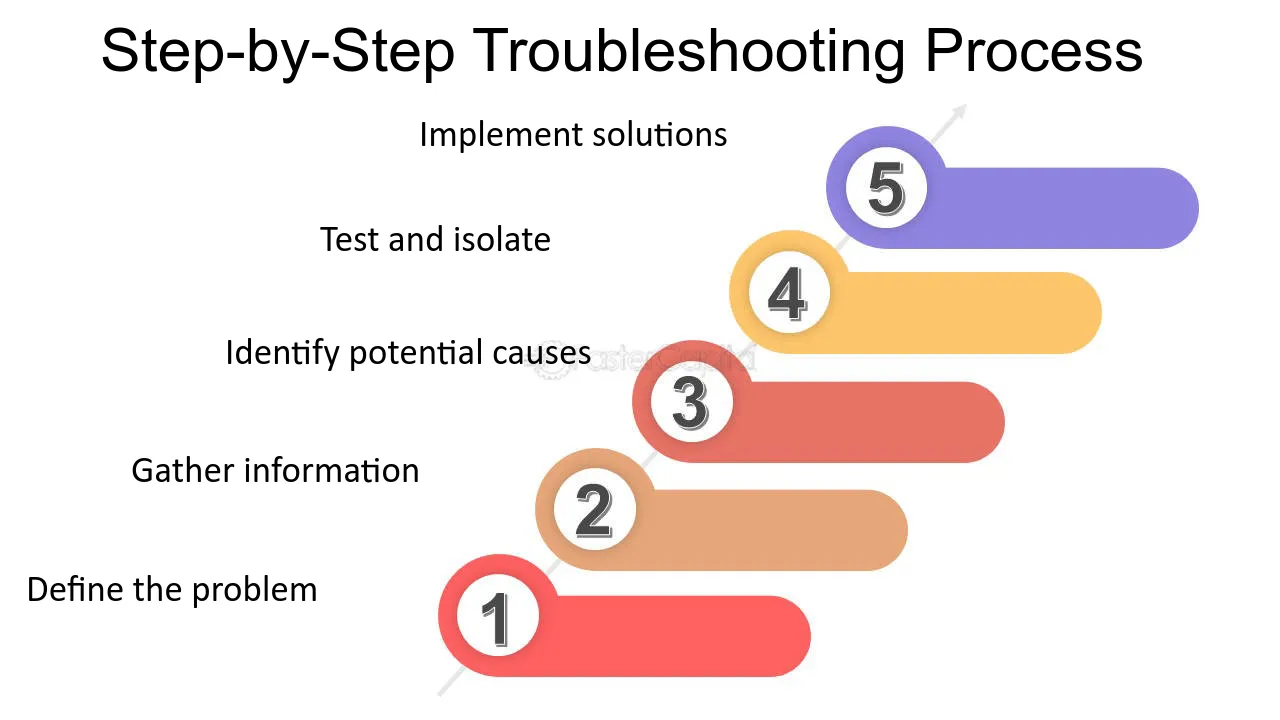
1. Identify the Problem
Observe error messages, unusual behavior, or performance changes before attempting any solution.
2. Restart the Device
Many temporary software issues disappear after restarting your computer, smartphone, or router.
3. Check Internet Connections
Verify Wi-Fi settings, cables, and network status if online services are not working properly.
4. Update Software
Install operating system and application updates to fix bugs, improve stability, and strengthen security.
5. Free Up Storage Space
Delete unnecessary files, remove unused applications, and organize your storage to improve performance.
6. Scan for Security Threats
Use trusted security software to detect malware or unwanted programs affecting device performance.
Benefits
Following this Common Tech Problems guide provides several valuable advantages:
- Reduces device downtime.
- Improves overall system performance.
- Saves money on unnecessary repairs.
- Increases confidence when troubleshooting.
- Extends the lifespan of devices.
- Supports safer and more reliable technology use.
Risks or Disadvantages
Although troubleshooting is useful, users should understand a few limitations:
- Incorrect fixes may create additional problems.
- Hardware failures sometimes require professional repair.
- Advanced issues may need specialized technical knowledge.
- Ignoring backup procedures may increase the risk of data loss.
Common Mistakes to Avoid
Many users ignore warning messages until problems become more serious. Another common mistake is installing software from untrusted sources, which may introduce malware or system instability. Some people also skip important operating system updates, leaving devices vulnerable to security risks.
Attempting complex repairs without proper knowledge can worsen existing issues. Following the recommendations in this Common Tech Problems guide and creating regular backups before making major changes can prevent unnecessary complications.
FAQs
What is the most common technology problem?
Slow device performance and internet connectivity issues are among the most frequently reported problems.
Why does my computer become slow over time?
Limited storage, outdated software, background applications, and malware can reduce performance.
Should I restart my device before troubleshooting?
Yes. Restarting often resolves temporary software and system issues.
How often should I update my software?
Install updates whenever they become available to improve performance and security.
When should I seek professional help?
If hardware damage, repeated crashes, or data recovery issues occur, professional assistance may be necessary.
Expert Tips
Maintain your devices regularly by installing updates, removing unnecessary files, and creating backups of important data. Keep antivirus software active and avoid downloading applications from unknown sources. Monitor storage space and restart devices occasionally to maintain smooth performance. Applying these Common Tech Problems solutions consistently will reduce technical issues, improve reliability, and help your devices perform efficiently for many years.
Conclusion
Technology problems are a normal part of using digital devices, but many can be solved with simple troubleshooting techniques. By identifying the issue, restarting devices, checking internet connections, updating software, and maintaining adequate storage, you can resolve many everyday challenges without professional assistance. This Common Tech Problems guide provides practical advice suitable for beginners and intermediate users alike. Make regular maintenance part of your routine, stay informed about software updates, and address small issues early to enjoy faster, safer, and more reliable technology every day.